
by Jonny | Jul 6, 2013 | Updates
I very recently cancelled my AdSense account; this was to do with not being able to be paid and I slowly built up a significant tab, which I was not able to withdraw or cash-in on. A couple days ago I decided to, essentially, bite the bullet and close the account. I mean, why continue building up cash, when you can’t withdraw it. The only way I could see myself withdrawing it is if I went back to Taiwan. Now, unless they owed me $2,000 then it’s simply not worth going back.
I had built up around $100 — which is somewhat significant and is of course something that I worked hard in getting. If you’re reading this, you are probably asking, why did you close your AdSense account that still had around $100 dollars in it?
AdSense does not allow you to change countries…
… from Taiwan to the United Kingdom. They don’t allow you to change countries due to legal purposes, according to the message that popped up when trying to change from Taiwan to the United Kingdom in the AdSense account settings tab. While I did reach the payment threshold, – and they did say they’d send payment within 90 days to an address in Taiwan where my friends are living, how will I cash that? I’m guessing I won’t be able to and now and that money will be in limbo. I even posted on the official Google product forums to no avail, so I guess this situation doesn’t happen very often.
It doesn’t matter anymore. I now have a UK AdSense account and while I’m posting about AdSense, I’d like to point out the very significant differences in the Taiwan (Asian?) AdSense control panel and the UK AdSense control panel.
UK AdSense vs Asian AdSense control panel
I’ll be honest by saying that I never really knew there was a difference in control panels until I recently switched over to the UK AdSense control panel; it’s significantly different to it’s Asian counterpart.
UK control panel lets you add your bank account details
The Taiwan or Asian control panel version doesn’t have the option to pay direct into your bank account. Instead, you have to either accept a cheque or payment via Western Union. – I, of course, accepted Western Union due to their service not charging any fees. While it seems the UK control panel gives you the option to add your bank account details, so they can pay you when you reach the £60 threshold.
UK version has new features and updated CSS
The UK version of AdSense looks newer. It looks sharper and it looks like someone spent some time cleaning the old version. Additionally, the UK control panel looks like it’s been updated to a newer version with more features, as it includes features like a revenue “Scorecard“, updated CSS markup (In a few areas), the ability to add new billing contacts (Which undoubtedly would have helped me with my issue), asynchronous advertisement code and probably more features that I haven’t found out about yet.
While I’ve likely lost the $100 that I earned, I think it’s time to move on and get to my next goal: £60 😀

by Jonny | Sep 17, 2012 | Updates
I have a gripe with journalists who do not know their military terminologies yet who write articles as if they are some sort of professional on the subject or who sensationalize articles by using more tabloid-type terminologies for the average viewer. These people in combination with their degrees that I assumed they earned in journalism also get their articles checked by others who also supposedly don’t know military terminologies.
So, you are asking yourself which article, from which journalist do I have a gripe with about. Well, it’s this article, here.
Firstly, it is the term “battleship” that bothers me the most. Battleships were invented a long time ago, they were called battleships considering they had very large guns on them, thus large and were equipped to take on most combat situations. They were soon phased out during WW2 as they were considered obsolete at the arrival of the aircraft carrier.
However, in this article, the author mentions battleship twice. I can assure you that no navy in the world now operates battleships, the US Navy was the last to use battleships in a combat role. That has now ceased.
What the author of this article wrongly labels as “battleships” are mere destroyers, missile cruisers, mine sweepers, aircraft carriers etc, which he does mention and I’ll give him credit on that. But this sensationalist type of journalism where they mention the word “battleship”, let’s just say it makes the article seem more prominent and seems as if something is going to happen. The key word “battle” is that sensationalist word. It makes his article seem so ridiculous when he mentions the word, and to someone who enjoys the history of the military it just seems stupid that he would be using that terminology altogether.
There has even been the same reaction on Reddit by some users who also believe this is sensationalist writing on the authors part. But, perhaps it’s due to the authors ineptitude.
And perhaps I’m overreacting, but these people are supposed to be professionals.
EDIT:
It seems that the Telegraph has changed the title of their article. It no longer features “battleship”.

by Jonny | Aug 24, 2012 | Updates
Recently, my 500GB hard drive failed on me and I looked on the internet for anything that could recover my files from the hard drive, which admittedly, I should have backed-up.
F:\ is not accessible. Data error (cyclic redundancy check).
Cyclic Redundancy Check Error & what I did.
I searched on the internet for a solution and found out what the error message means. CRC (Cyclic Redundancy Check), I looked at a few solutions however none of them worked for me. So, I thought instead of trying to get my hard drive accessible again, I thought I’d just get the data off first that I needed. (The data I should have backed up)
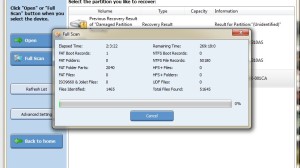
Recovering files on a failed hard drive
Recovery
So, I found this as a solution. I’ve managed to already get access to around 1,000+ files (Though they aren’t the files I need, so I’m continuing the scan), however there is a data-limit on the program, since I’m using the trial version. (The program, bought, costs around $59.) The paid version allows you to download as much information from the defective hard drive, while the trial allows you to only take off around 1GB of data.
That’s all I need as I’m purely trying to recover a web design which I originally bought and I want to place it for free on my website over at SimpleTemplates.org. It’s only a small file.
How long?
However, according to the program to scan the entirety of the 500GB hard drive, I need to wait 255 hours, which is around 2 weeks of concurrent scanning. I can do this, but eventually or before all that, it will find this web design, so I no longer need to continue any more scans.
So, what program are you using to do this?
The program I’m using was created by Power Data Recovery. (Google search; not direct link to their site) – They make other premium programs for hard drive failures which includes automatic back-ups and the like.
Also for future reference, I have also done some research into other programs that have been recommended in the blogosphere:
- PC Inspector File Recovery
- NTFS Reader
- Restoration
- Undelete Now!
Hopefully, someone will have found this useful. Hardware failures, especially hard drive failures are not fun at-all.

by Jonny | Aug 20, 2012 | Updates

In the middle of a Udacity.com lesson! 🙂
Recently, I found this great website where you can learn how to program.
I thought I’d give my experience and thoughts on how things are going and what Udacity provide and who they are.
So what is Udacity.com?
The site essentially offers free courses where you can learn programming. Right now, I’m studying the first unit of programming (CS101) and I’m in the process of learning Python. I’ve installed the Python interpreter and Java as well, for that matter. (Though, I’ll be learning Java later on, once I get the gist of Python)
CS101?
CS101 is a course on the Udacity website and essentially it tells you the basics of programming and it is a step-by-step guide into programming with Python. At the end of CS101, I should have completed programming my own search engine equipped with a cool little robot website indexer.
Links:
http://www.udacity.com/
http://www.codecademy.com
Review of UNIT-1
I’ve gone through UNIT 1 and I feel I have more of an understanding with Python, although I’m still confused in some areas. – This may mean I have to go back through the entire UNIT again, so as to ensure I haven’t missed anything. I’ve written only 2-pages and should have probably noted down a lot more. I’m actually quite excited in learning Python as this type of interactive learning is quite fun and not too confusing. Although on some occasions it has been a little confusing for me.
I hope to make it through this course alive and well, with hopefully a new understanding of programming. – I’ve also found another website which has also been helpful called “Codecademy.com”, that is equally as good although there aren’t any university professors explaining things, you have a highly interactive interface helping you along the way.
I just hope I can focus on this one thing and not get too distracted. I think this is a great opportunity and I hope I can get something out of this. I have to give thanks to whoever set this up and especially to the professors who assembled all of this. Now I have homework to do! 🙂
Update
I’ve decided to take a different direction. I feel that for me the Udacity.com course was a little confusing. I feel as if I couldn’t understand a lot of the questions as the course furthered on. I feel this is due to a lack of practice. While I did repeat UNIT 1 again, I still had the same issues. In the mean time, I’ve been using Codecademy.com. – I feel that the examples and the longer explanations there are more understandable for me. Once I complete the Codecademy course I feel I’ll have a better understanding of the Udacity course and of the requirements in order to create the search engine.
So what’s the major difference?
Udacity explains and teaches too much of the theory, while Codecademy explains and teaches a lot of hands-on approaches. I’m not saying that is all of what Udacity does, but Codeacademy is specifically telling you how to do things with better examples. (I feel that this is a little easier for people who are just starting out learning Python) It does indeed (Codecademy) hold your hand along the way, but if you are just starting out, how else are you going to learn? If it doesn’t hold your hand and you get confused then it can totally put you off of programming. At least with this approach you can learn the right way to do things then apply it in other scenarios.
So, perhaps you have had the same issues as me and the Udacity course is a little confusing, well, I feel that the Codecademy course will ease you in with better explanations and examples.
Step 1:
Codecademy.com (Python)
Step 2:
Udacity.com (CS101)
Why do Codecademy first then Udacity?
As said previously: I feel this way, you can can have a better understanding of Python before heading onto the Udacity course. While I like Udacity.com, I feel, perhaps, that a lot of explanations are quite difficult to grasp. Which is why I think Codecademy is a little better at the explanations. I almost feel that once you complete the Codecademy courses you can take that information you have learned and use it on Udacity.com.
I’m trying really hard to get this and I know it will take time, as my mathematical abilities suck, but we’ll see where this gets me. I have been writing down lots of notes so hopefully when I go out and I can just pull them out to remind myself what I’ve learned. I’m also trying to remember how to code and what the layout should be. I’m thinking of buying a book on Python just so I can read it when I’m out. I think I need to make this like an idol-worship thing and become fanatic about learning the language, in order to improve.
Life is tough shit, here in the real world. Being lazy, doing nothing is nice and relaxing, but that won’t get me a good paying job in the future. Plus, if I can learn a programming language, then if at any point I go to university, it won’t be so difficult on me. (i.e. It’s like preparing for university) — I’ll probably have quite the advantage in comparison to not having much knowledge on programming itself.

by Jonny | Jun 29, 2012 | Updates

A few days ago Google revealed its new tablet called Nexus 7 which it hopes to release into the market by 2013.
Specifications:
7″ 1280×800 HD display
1.2 megapixel camera (Front camera)
1GB of RAM
Quad-core Tegra 3 chip
4325 mAh (Up to 8 hours of active use)
WiFi 802.11 b/g/n
Android OS 4.1 (Jelly Bean)
Micro USB
Price: $199
[Source, more info]
Although the screen is only 7″ and the only camera (The front camera) is quite poor comparison to the $499 iPad 2’s 5 megapixel camera, for the price of $199, you can’t ask for much more. However, if you just want to use this for browsing the web, then this is the perfect tool. Granted you need to be in a WiFi equipped area to use most of the tablet’s functions, you can in-fact use your phone’s 3G connection to create a WiFi hotspot. That’s really my main concern, as it’s quite troublesome or inconvenient to be setting up a connection like that every time you want to access the internet.
I guess the main advantage on this tablet in comparison to Apple’s iPad is that you can connect this to your computer and then you can download films onto it without too much hassle.
I really want to buy this when it gets released, but hey, it’ll be released by 2013. I wouldn’t be surprised if they released it by Christmas time to rake in some Christmas sales.
I’m definitely looking at this as a serious buy as a gift I’d like to buy for myself. However, at the moment, I think my current smart phone is more than capable of doing the job that I require it to do.
Also, the actual tablet is being developed by a Taiwanese company, the large firm ASUS which has created previous “Google phones”. You would really have thought they would have contracted Motorola to develop the hardware for their new tablet, seeing as they bought Motorola for quite an expensive price tag. But hey, I’m glad they are supporting a company that operates in my country. (Taiwan) 🙂

