
by Jonny | Aug 24, 2012 | Updates
Recently, my 500GB hard drive failed on me and I looked on the internet for anything that could recover my files from the hard drive, which admittedly, I should have backed-up.
F:\ is not accessible. Data error (cyclic redundancy check).
Cyclic Redundancy Check Error & what I did.
I searched on the internet for a solution and found out what the error message means. CRC (Cyclic Redundancy Check), I looked at a few solutions however none of them worked for me. So, I thought instead of trying to get my hard drive accessible again, I thought I’d just get the data off first that I needed. (The data I should have backed up)
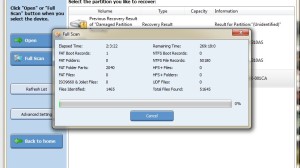
Recovering files on a failed hard drive
Recovery
So, I found this as a solution. I’ve managed to already get access to around 1,000+ files (Though they aren’t the files I need, so I’m continuing the scan), however there is a data-limit on the program, since I’m using the trial version. (The program, bought, costs around $59.) The paid version allows you to download as much information from the defective hard drive, while the trial allows you to only take off around 1GB of data.
That’s all I need as I’m purely trying to recover a web design which I originally bought and I want to place it for free on my website over at SimpleTemplates.org. It’s only a small file.
How long?
However, according to the program to scan the entirety of the 500GB hard drive, I need to wait 255 hours, which is around 2 weeks of concurrent scanning. I can do this, but eventually or before all that, it will find this web design, so I no longer need to continue any more scans.
So, what program are you using to do this?
The program I’m using was created by Power Data Recovery. (Google search; not direct link to their site) – They make other premium programs for hard drive failures which includes automatic back-ups and the like.
Also for future reference, I have also done some research into other programs that have been recommended in the blogosphere:
- PC Inspector File Recovery
- NTFS Reader
- Restoration
- Undelete Now!
Hopefully, someone will have found this useful. Hardware failures, especially hard drive failures are not fun at-all.

by Jonny | Aug 20, 2012 | Updates
In the middle of a Udacity.com lesson! 🙂
Recently, I found this great website where you can learn how to program.
I thought I’d give my experience and thoughts on how things are going and what Udacity provide and who they are.
So what is Udacity.com?
The site essentially offers free courses where you can learn programming. Right now, I’m studying the first unit of programming (CS101) and I’m in the process of learning Python. I’ve installed the Python interpreter and Java as well, for that matter. (Though, I’ll be learning Java later on, once I get the gist of Python)
CS101?
CS101 is a course on the Udacity website and essentially it tells you the basics of programming and it is a step-by-step guide into programming with Python. At the end of CS101, I should have completed programming my own search engine equipped with a cool little robot website indexer.
Links:
http://www.udacity.com/
http://www.codecademy.com
Review of UNIT-1
I’ve gone through UNIT 1 and I feel I have more of an understanding with Python, although I’m still confused in some areas. – This may mean I have to go back through the entire UNIT again, so as to ensure I haven’t missed anything. I’ve written only 2-pages and should have probably noted down a lot more. I’m actually quite excited in learning Python as this type of interactive learning is quite fun and not too confusing. Although on some occasions it has been a little confusing for me.
I hope to make it through this course alive and well, with hopefully a new understanding of programming. – I’ve also found another website which has also been helpful called “Codecademy.com”, that is equally as good although there aren’t any university professors explaining things, you have a highly interactive interface helping you along the way.
I just hope I can focus on this one thing and not get too distracted. I think this is a great opportunity and I hope I can get something out of this. I have to give thanks to whoever set this up and especially to the professors who assembled all of this. Now I have homework to do! 🙂
Update
I’ve decided to take a different direction. I feel that for me the Udacity.com course was a little confusing. I feel as if I couldn’t understand a lot of the questions as the course furthered on. I feel this is due to a lack of practice. While I did repeat UNIT 1 again, I still had the same issues. In the mean time, I’ve been using Codecademy.com. – I feel that the examples and the longer explanations there are more understandable for me. Once I complete the Codecademy course I feel I’ll have a better understanding of the Udacity course and of the requirements in order to create the search engine.
So what’s the major difference?
Udacity explains and teaches too much of the theory, while Codecademy explains and teaches a lot of hands-on approaches. I’m not saying that is all of what Udacity does, but Codeacademy is specifically telling you how to do things with better examples. (I feel that this is a little easier for people who are just starting out learning Python) It does indeed (Codecademy) hold your hand along the way, but if you are just starting out, how else are you going to learn? If it doesn’t hold your hand and you get confused then it can totally put you off of programming. At least with this approach you can learn the right way to do things then apply it in other scenarios.
So, perhaps you have had the same issues as me and the Udacity course is a little confusing, well, I feel that the Codecademy course will ease you in with better explanations and examples.
Step 1:
Codecademy.com (Python)
Step 2:
Udacity.com (CS101)
Why do Codecademy first then Udacity?
As said previously: I feel this way, you can can have a better understanding of Python before heading onto the Udacity course. While I like Udacity.com, I feel, perhaps, that a lot of explanations are quite difficult to grasp. Which is why I think Codecademy is a little better at the explanations. I almost feel that once you complete the Codecademy courses you can take that information you have learned and use it on Udacity.com.
I’m trying really hard to get this and I know it will take time, as my mathematical abilities suck, but we’ll see where this gets me. I have been writing down lots of notes so hopefully when I go out and I can just pull them out to remind myself what I’ve learned. I’m also trying to remember how to code and what the layout should be. I’m thinking of buying a book on Python just so I can read it when I’m out. I think I need to make this like an idol-worship thing and become fanatic about learning the language, in order to improve.
Life is tough shit, here in the real world. Being lazy, doing nothing is nice and relaxing, but that won’t get me a good paying job in the future. Plus, if I can learn a programming language, then if at any point I go to university, it won’t be so difficult on me. (i.e. It’s like preparing for university) — I’ll probably have quite the advantage in comparison to not having much knowledge on programming itself.

by Jonny | Jun 3, 2012 | Updates
I wrote an article about this around two weeks ago, and website security is paramount, especially so when leaving your website unattended for a while. I did this an faced the consequences of having my sites hacked/cracked and I regret neglecting my website in such a way, as it was such a pain to sort this mess out.
I lost a lot of my Google rankings in search results, which hit my traffic big-time, however considering I don’t worry about that much it isn’t much of a problem. However, for others who won’t know how to fix an infected site, it is better to totally re-install whatever script you’ve got installed. For example, most of my websites run on WordPress, and when my sites became infected as I hadn’t updated the latest version, the best thing to do was totally re-install my WordPress installation. – This takes care of the following:
- You can be at ease and know that whatever virus which has infected your site has been removed. So as long as you have totally replaced all your files, other than your images in your WordPress installation.
- You get rid of any back doors the hacker may have injected into your website because of any script vulnerability.
Trust me on this, don’t neglect your website. It is much easier to first take care of your website rather than have to worry about it later, as it will become much harder to ‘fix’ the longer you leave it.

by Jonny | May 20, 2012 | Updates
I’ve recently just experienced something which has inundated my experience as a person who runs websites that are online. Security is a big thing and as soon as you let your guard down, there are people out there who will go out of their way to find ways to exploit websites which haven’t been updated. i.e. Easy targets
Since I’ve been working full-time, my main website armour.ws faced a few attacks from people trying to upload .html files which contained phishing websites, mainly or only to do with banks.
I first noticed this when my web host informed me and when Google also informed me. I’m not surprised at-all if they’ve penalised my website. But all that matters is that I’ve secured my website.
I’ve totally re-installed WordPress on that site, backed up everything again, looked at the MySQL database for any anomalies and I’ve started anew with the design to ensure that it wasn’t the theme/design causing any cracks in terms of security. I’ve also installed a few firewall scripts for WordPress, essentially a tool which will scan all my files for any anomalies.
I just let my guard down, stopped updating my website and suddenly I find myself being attacked. Now things should be okay, but I’ll say something, it would have been a lot easier to keep my site updated from the start. I spent most of the day making modifications, backing up, optimizing the MySQL database and changing a few aspects and fixing a few things on the website itself.
I will also stress, as would other experienced webmasters, MAKE BACKUPS constantly. You never know when you’ll need a backup to help you out of a disastrous situation.
by Jonny | Jan 26, 2012 | Updates
If you have been reading my blog, which likely isn’t the case, you’ll have read that I went back to my parents place for Chinese New Year/Lunar New Year. I took a few pictures here and there, and they were large files which meant they needed compressing before I could upload them to my blog. I looked at a few software’s and most if not all I came across either placed a watermark on your image (As it was the free version of that particular software I downloaded) or you had to compress files, one by one; a timely process if you have lots of images. I have my laptop, on which I had already installed a software before-hand called “Fast Stone Image Viewer“.

As you can see from the image above, there are lots of options and this may look complicated, especially if you are only looking for a simple image compressor to compress your large files. However this gives you lots of options. For example, as you can see in the image above, you can add a border to give off a nice effect around the image itself.
You can also see me highlighting with my cursor on the “Batch Covert” option in tools, once you have highlighted the images in the Fast Stone Image Viewer browser. Simply click that and you’ll be brought to this part of the program:

From the above image, you can see that it has all the images listed on the right hand side. You can make additional changes, such as adding a border, changing the names of the files etc in batch and generally selecting the best options which you want personally. This tool is very handy. It has compressed my images from around the size of 3-4mb to 1mb. (While keeping a very high resolution of over 2xxx by 2xxx) You can of course make the resolution smaller, which will significantly cut down the size of the file, while seeing no reduction in quality.
Best thing of all about this software? It is free. When I mean free, it isn’t that bullshit, which comes with Ad-ware or you do not get messages popping up all the time suggesting you to buy the “pro version”. This is totally freeware. Although they do sell a version which you can buy, you really don’t need it, if the above is all your are looking for.
You can download the software on their website here: http://www.faststone.org/

